

Getting KiCad working
One of the things I want to get working is KiCad so I can also do the electrical design stuff also on the laptop I'm bringing to FOSDEM. It turns out this is pretty hard since I've been building BodgeOS as wayland-only distribution and it's seems that only pretty recently there has been options for running KiCad without Xorg.
I've been packaging a lot of dependencies for getting KiCad working like the dependencies for opencascade and libgit2. Which means I have to mess it some of the oldest packages I've added and make them more complete, like adding fortran support to gcc since deep down it's required for py3-numpy.
Working on this always makes it very visible how painfully bloated some dependency chains are. Like for libgit2:
nodejs -> npm -> libllhttp -> libgit2
Libllhttp uses a bit of typescript to generate c++ code in the parser, which means I now have to build nodejs because it's a dependency for low level libraries. And building nodejs is pretty painful, especially if your laptop has 8GB of ram.
After some days I managed to get the whole dependency chain up to libgit2 built, but one of the other major dependencies for KiCad is wxwidgets. Since wxwidgets is a toolkit it has a lot of fun dependencies to make it's various components work. Like it has a whole multimediastack which I luckily am not going to need soon, so I can just not build that part.
The part that did make me give up on packaging KiCad is that I'm going to need a wxwidgets build with the wxWebView component to make KiCad run. To get that up and running wxwidgets needs webkit2gtk... and webkit is absolutely painful to build.
Codecs and containers and protocols
At some point I'm going to need a lot more multimedia support in BodgeOS. Mostly because gstreamer is a dependency for a lot of things and ffmpeg is used everywhere.
Building codecs is suprisingly easy. A nice change of pace from working with the various toolkits. BodgeOS now has support for H.264, H.265, two implementations of AV1 and a handful of extra image encoders/decoders. Just enough to build gstreamer and gstreamer-plugins-bad. In this process I also fixed up H.265 in Alpine.
Display configuration
Since I've been using my x280 now as main developing machine for a while I've been hooking it up to external monitors. And one of the things I dislike about tiling window managers like i3 and sway is that simple things become a lot harder. One example is things like managing wifi networks and configuring attached displays.
The solution to this seems to be either installing the management tools for another desktop environment to do these things, doing it all in the shell, or spend a bunch of time hooking shell scripts together with wofi to have a somewhat interactive experience.
This works absolutely fine of course, but what I imagined is something a bit more integrated looking, like how Gnome has it's standard popup for configuring networking and other settings, or how windows has a sidebar you can open with win+p to quickly switch monitor configurations.
I decided to make a graphical utility that's designed to integrate with Sway for this instead. It's written in Go and uses gtk3/gtk-layer-shell to spawn an overlay sidebar with the monitor configuration for Sway.
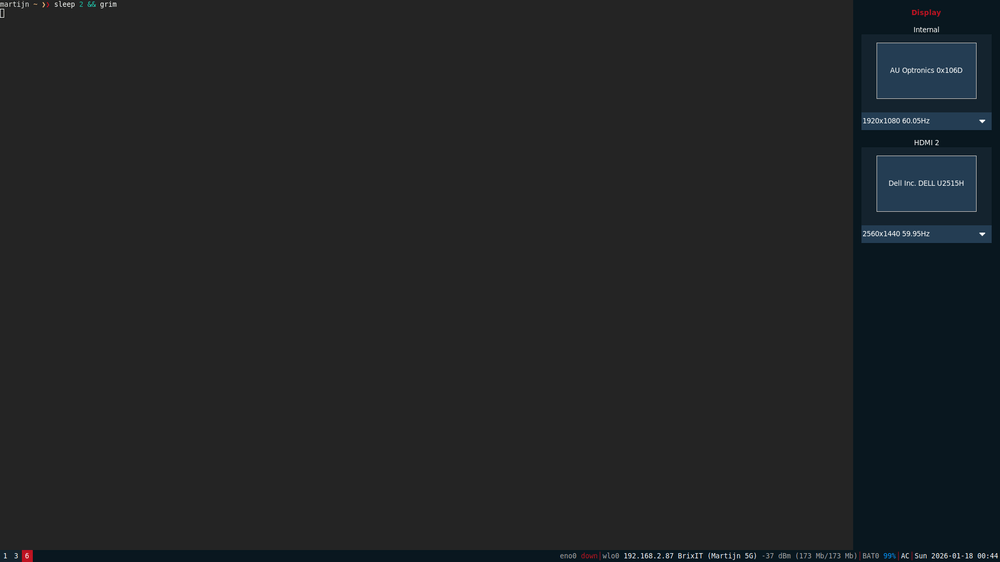
For now it allows switching the resolution and refresh rate of the monitors attached to the system. To make it slightly more complete it would also need some options to swap around the places of the monitors because sometimes Sway decides that my monitors should be the other way around depending on if the monitor was plugged in first or sway was started first.
But more importantly, I now have the framework to make more configuration bars that I can trigger by clicking on the various blocks of the statusline. This will need to wait a bit though until I'm a little bit further with writing bodge-netd which is going to manage the ethernet and WiFi network connectivity on my laptop.
The monitor config sidebar is called bodge-randr and does not depend on any other parts of BodgeOS so it's neatly usable in any Sway environment.
Embedded development toolchains
One of the other things I've always taken for granted is how easy it is to get a compiler for a random microcontroller I want to work on. Most distributions at least provide you with a cross compiler for arm-none-eabi which makes it possible to build firmware for a lot of microcontrollers.
I want to be able to build the firmware for all the parts of the FOSDEM video box on my laptop so I'll need a toolchain for that. Luckily all the firmware for that is 32-bit ARM Cortex-M microcontrollers so I only need a single cross compiler for it.
After spending way to much time on getting this nicely working with a gcc-$target and binutils-$target package like I imagined it I decided to just copy the way Alpine did it, otherwise it would be several more days of debugging obscure GCC build failures.
Now I have a gcc, g++, binutils and newlib package for arm-none-eabi which successfully can build the firmware I need and hopefully is somewhat easy to copy-n-paste for other architectures I might need. I decided here to not have one cross-embedded package like Alpine for this that builds all the toolchains and then splits the package. This is mainly so I don't have to wait until the heat death of the universe until the build job is done, and also because the bodge-builder can easily parallelize the build over multiple machines this way.
Getting KiCad working 2: electric boogaloo
So I'm pretty sure I won't be able to get a proper build of KiCad running in time before FOSDEM so time for my fallback plan: getting Flatpak working and running it through that.
The dependencies for flatpak seemed a lot easier to deal with to get running, the the problems are always in the details with long dependency chains. My current pain point here is rust which is needed for librsvg which is used by libappstream for what I assume is rendering SVG application icons. And libappstream is also used by flatpak for managing the very much non-graphical metadata. How hard can building one small svg library be?
Turns out the rust package I made a year ago is slightly too old to build librsvg so I just need to update it a bit. BodgeOS was still on Rust 1.83 and I need something at least somewhat newer than that for rsvg but it's unclear what the minimal version would be.
Apparently it is not possible to just build Rust 1.92 with using the Rust 1.83 compiler. As far as I can find it's mostly only possible to build Rust $ver using Rust $ver-1 and the rust project does almost monthly major releases. It seems like other self-hosting programming languages do a more sane thing where they require the code for the compiler to use a more limited subset of the language features so you don't have to build every intermediate compiler to get the most recent version.
A build of Rust on my buildserver takes roughly 3 hours and I need 9 builds to be up-to-date again which is painful, but manageable. But it doesn't stop with Rust because I also need to upgrade LLVM versions in between, and upgrading LLVM major versions means rebuilding several other packages that only function if they exactly track the version of the LLVM package, with Mesa being at the top of that dependency tree. So this is basically why I'm writing a part 6 blog post, since this is day 3 of upgrading Rust already.
Alternatives
One of the things I don't really like is how multiple concurrent versions of LLVM are dealt with in Alpine. Which is a lot of symlinks and making sure only one of the llvm packages (and one of the clang packages) have the flag set that it's the current blessed one that should provide /usr/bin/clang.
What I've been missing for cases like this is the alternatives system from Debian. So I wrote a new one for BodgeOS called bodge-alternatives that provides similar functionality. And with similar I mean that I did not research how the Debian one works and I only remember interacting with it years ago.
In BodgeOS packages it's now possible to register an alternative using this code:
$ alternatives --define "$pkgname" "/usr/bin/editor" "/usr/bin/vim" 10
Creates or appends /usr/share/alternatives/$pkgname.yaml:
- target: /usr/bin/editor
  option: /usr/bin/vim
  priority: 10
The bodge-alternatives package registers a trigger in the package manager that any changes to these yaml files will make it reinstall the correct symlinks.

By default for every target that's defined it will install the symlink to the option with the highest priority unless you manually select another option with the alternatives command:
$ doas alternatives --choose /usr/bin/editor
/usr/bin/editor
1) * /usr/bin/vim [priority 10]
2) - /usr/bin/nano [priority 5]
3) - /usr/bin/ed [priority 1]
Choose alternative: 1
update alternative: /usr/bin/editor -> /usr/bin/vim

$ doas alternatives --pick /usr/bin/editor /usr/bin/vim
update alternative: /usr/bin/editor -> /usr/bin/vim
This is a pretty simple example for picking a text editor, but this also works great now for the multiple clang versions. The clang package registers an alternative for all the binaries and libraries it provides and it uses the major LLVM version number as the priority for the option. With this /usr/bin/clang will always point to the newest clang package by default and I don't have to track that inside the packages and I don't have to rebuild old clang/llvm packages to disable the "is-latest" flag when a new release is out.
And to complete this I also modified abuild to store the alternates data in the package metadata so it's possible to find with apk utils:
$ apk search alt:/usr/bin/editor
vim-9.1.2089-r0
$ apk info -P clang20
alt:/usr/bin/clang
alt:/usr/bin/clang++
...
Split kernels
Currently my experiment with split kernels is not in the BodgeOS repositories since adding the kernel-split-full package that has dependencies on all the module packages will corrupt the repository index.
Thankfully the Alpine Linux developers are quite helpful and also had a look at this and figured exactly where the problem in apk occurs, even when I'm still on the older v2 codebase of apk in BodgeOS.
Also when else do you get the chance to file an issue with a title like "Cannot read the APKINDEX anymore after adding 6200 dependencies" :)
Due to messing with broken LLVM builds and its dependencies for a bit I've added a flag in the build system to mark specific packages as "don't even try to build this" which also conveniently allowed me to actually push the split kernel package to bodge-ports in kernel/linux-split.